
IONET Software
Enterprise Search for HCL Notes: IONET FT Search Manager
As an enterprise search for HCL Notes, the FT Search Manager is a fast, multifunctional search engine that lets every user search all databases (e.g., email, archives, etc.) at the same time, locally or on the server, with standard queries (full-text search).
How the search works
The search in the database itself can be started from a client, a browser or a web service. The databases to be searched can be local or on the server.
You can search your emails, archives, file systems, email journals, applications, document repositories, websites, portals, application suites or Quickr at the same time. Index information is searched as well.
Results are displayed in the context of the document (as in a web search). This makes it easier to find the documents you want, and a spell check adds even more accuracy.
What the search looks like
-
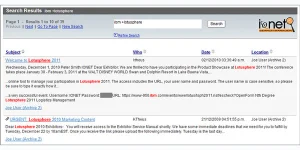
Email search results are displayed ordered by relevance.
-
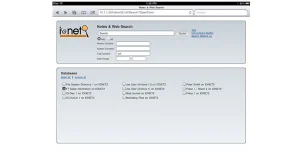
You can use an iPad, iPhone, smartphone or tablet to search for files in the system at the same time.
-
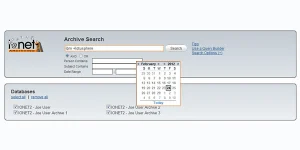
Cross-application search methods to open web search forms without additional functions.
-
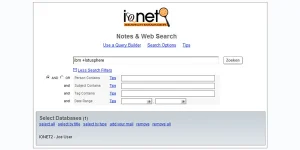
Standard Notes search – results are shown by relevance, regardless of the database.
Search methods and aspects
FT Search Manager (FTSM) can be offered as an OEM version for integration into your own application. We adapt the product exactly to your requirements. For example, we have built our FTSM software into dedicated legal and compliance products and integrated local web search functions through Domino Offline Services (DOLS).
-
Email & archive search
- Automatic for every user
- No administrative intervention
- User settings are configured automatically
- Choice of a toolbar or widget search method
-
Toolbar icons
- Search method is installed via email
- Mail template (mail DB) can also be modified
-
Email dialog
- For all types of email search, the users (email & archive DB) are determined automatically
- The available options are controlled by the administrator
- Language selection (e.g., English, French, etc.)
-
Searching file systems
- Index local files
- Search function for the following file types: doc, docx, xls, xlsx, ppt, pptx, vsd, pdf, txt, htm and html
- File system index customization options
- Files found are opened with the host application
- You can use an iPad, iPhone, smartphone or tablet to search for files in the system at the same time
-
Email search results
- Search results are displayed ordered by relevance
- Every customer can configure their own options (e.g., copy database, send newsletter, etc.)
-
Discovery & compliance search
- This search lets the administrator or certain users (e.g., the legal department) search thousands of databases at the same time
- Discovery search can only be performed from the Notes client
-
R8 Search Scope
- R8 Search Scope integration possible
- Configuration of Search Email & Archive widgets
-
Cross-application search methods
- Web search forms and search results
- Widget catalogs can be implemented, so preconfigured widgets can be used
- Frame/iFrame portal search can be integrated and offers a seamless search function for all users
- Complete application suites with plug-in action via dialog box
- URLs can be generated to run a search without opening a search form
-
iNotes customization
- Users can search their email & email archives directly through iNotes
- The customized R85x iNotes database is provided
- Special requirements are modified with stylesheets
-
Standard Notes search
- Open the search database directly
- Administrators set the options
- Results are shown by relevance, regardless of the database

We are an HCL Advanced Business Partner.
Peter Groh, Managing Director of NotesIT GmbH
Products and solutions
Talk to us
Call us or write to us. You speak directly with our specialists.

Peter Groh
Managing Director
NotesIT GmbH
Hahnweg 4, 96450 Coburg